FourRealities User & Administrator Guide
How FourRealities shows, for each Jira issue, which delivery evidence exists: a decision record, a Definition of Done, a pull request and an audit seal. How to read the Reality Alignment Index (RAI), use the project dashboard, link decision records, and record Code exceptions and rework reasons.
1. The Four Gates
Delivery evidence for one piece of work is spread over several places. FourRealities checks four kinds of evidence for each issue and shows each one as a gate:
- Intent: a link to a Confluence page on your site, or a link to an issue of a decision or specification type.
- Process: the Definition of Done record of DefinitionGuard, or the checklist property of Checklists for Jira (HeroCoders), whichever a Jira administrator chooses. A DefinitionGuard record counts only when FourRealities verifies its signature.
- Code: pull request count and state from the Jira Development field, which your GitHub, GitLab or Bitbucket integration for Jira populates.
- Audit: an approval seal record written by LedgerSeal.
Each check shows a state, for example Evidence found, Evidence missing, Not used on this site or Not applicable, and names its source. A DefinitionGuard or LedgerSeal record is scored only when its signature is verified. A record FourRealities cannot verify (unsigned, or signed with a key it does not trust) counts exactly like no record: Evidence missing on a Done issue, Not applicable before Done. A record changed after signing, copied from another issue, or older than a record already seen counts as Evidence missing, also before Done. The panel still says what the record reports and why it did not count. A Checklists for Jira checklist cannot be signed, so it never counts as evidence. A check your site does not use is not scored. Pull request state is marked as heuristic, because apps cannot read pull request approvals. A merged pull request is not shown as reviewed.
2. The Reality Alignment Index (RAI)
The Reality Alignment Index (RAI) is the share of rated gates with evidence found, from 0 to 100. Only checks with evidence found or evidence missing are scored. Excepted, not applicable, not used and needs-recheck checks are not counted. The RAI is always shown after the gates and with its parts: click Why N%? in the issue panel to see them.
Each rated issue gets a risk level from its RAI:
- Low: 85 or more.
- Medium: 70 to 84.
- High: 50 to 69.
- Critical: below 50.
FourRealities never ranks people by the RAI.
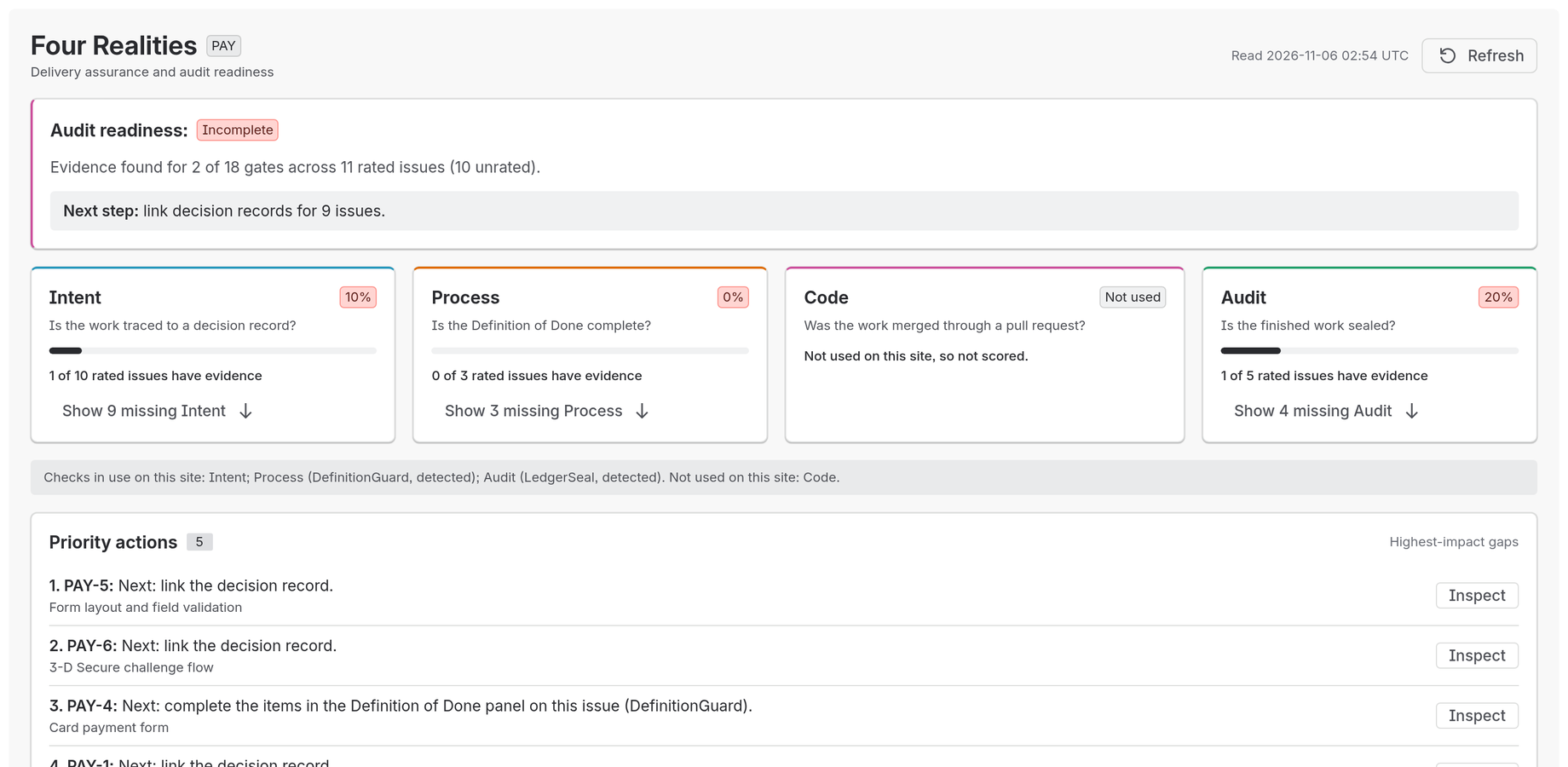
Figure 1: Project dashboard with audit readiness, the four check cards (Code "Not used" on a site with no pull request data), the checks in use and Priority actions.
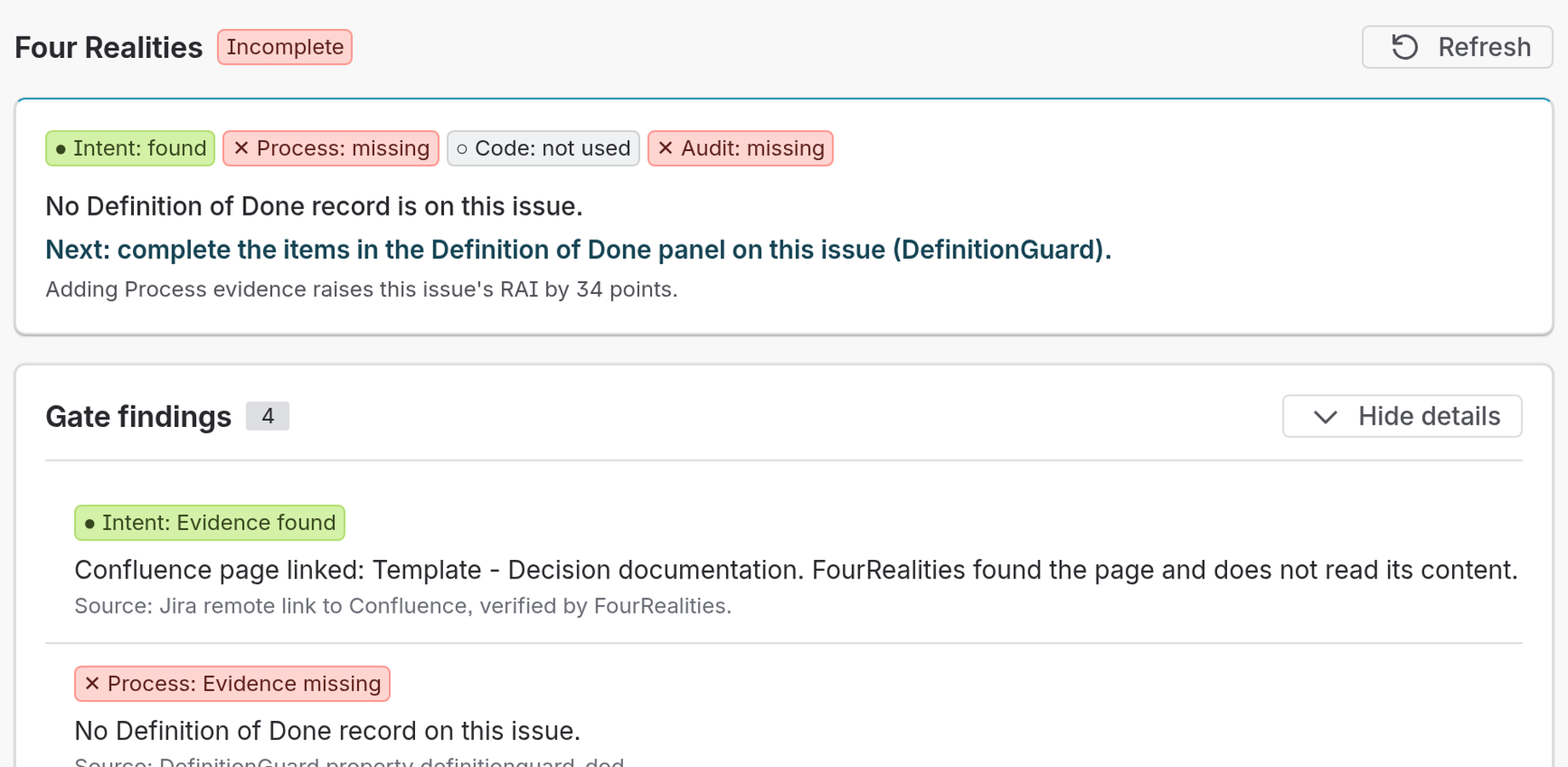
Figure 2: The issue panel with the checks as a chain, the next step naming the Definition of Done panel, and the findings with their sources.
3. Project Dashboard
Open Four Realities from the project navigation. The dashboard shows:
- Audit readiness and the next step for the project.
- One card per gate with its rate and counts (for example "1 of 1 rated issues have evidence"), and a Show N missing button that filters the triage table.
- Priority actions: the issues with the highest-impact gaps. Click Inspect to see an issue's gates.
- Coverage at a glance: rated average alignment, rated scope, weekly change and risk distribution.
- Issue triage: all issues, with search by key or summary and filters for assignee, sprint and gate.
- Trend: RAI and gate evidence rates for the last four weeks. The trend starts after two weekly snapshots.
Project snapshots refresh daily and when you click Refresh. FourRealities reads at most 2,000 issues per project, newest first, and says so when it stops.
4. Rework Loops & Rework Reasons
FourRealities counts rework loops from the issue changelog, using status categories:
- A rework loop is a move from a Done-category status back to a status that is not Done, or a move from In Progress back to To Do.
- A move between two statuses in the same category (for example "In Review" back to "In Progress") is not counted.
- When an issue has rework loops, the Process gate in Gate findings shows "Rework loops: N." and an Add rework reason button.
- Rework reasons are kept as a list with who and when. They never change a gate.
5. Data Sources, Egress & Access
FourRealities runs on Atlassian Forge and declares no external egress. It calls no external (non-Atlassian) APIs. It reads:
- Jira: issue fields, changelog, remote links, issue links and the issue properties written by LedgerSeal, DefinitionGuard and HeroCoders Checklists, as the signed-in user or as the app.
- Pull requests: the Jira Development field, populated by your existing GitHub, GitLab or Bitbucket integration for Jira. FourRealities cannot read pull request approvals.
- Confluence: when you search in the Link decision record dialog, FourRealities calls the Confluence REST API of your own Atlassian site, as you, through Forge. It also reads Jira remote links that point to Confluence pages.
- Storage: snapshots, Code exception events, rework reasons and site settings are kept in Atlassian Forge storage.
Jira administrators set the evidence source of each check, the decision issue types and the approver groups in Jira settings > Apps > FourRealities gate authority. FourRealities stores account ids only where a rule needs them, reports them to Atlassian every week and erases the ids of closed accounts. With an inactive licence the app shows "Licence not active" and reads nothing.
6. Closing Gaps from the Issue Panel
When an issue shows missing evidence, the issue panel names the next step. You can:
- Click Link decision record, search Confluence pages by title (or enter a page address and title), and click Add link. FourRealities adds a Jira remote link and the Intent gate updates.
- Click Request Code exception for work that needs no pull request, and give a reason. A project or Jira administrator, or a member of an approver group, who is not you or the assignee must approve it. Until then the Code gate stays "Evidence missing". Administrators can also reject or revoke an exception, and the requester can withdraw it.
- For a merged pull request, click Request retrospective review to post a comment on the issue asking for a review.
- When Process or Audit is in use, the next step names the Definition of Done panel (DefinitionGuard) or the Approval Seal panel (LedgerSeal) on the issue. FourRealities never writes their records.
- Click Refresh to read the issue again.
 Eliya
 Jira Governance
 Dial